STICKER STUDIO
HOW TO USE IT
The complete guide for customers, No Limit mechanics, managers and staff.
The screenshots in this guide use example designs and plates. Everything you see in the city works the same way.
SECTION 1Quick start
CUSTOMER Getting a sticker on your car takes five steps:
- Open the studio. Type
/stickersanywhere in the city, or go to No Limit Customs in Rockford Hills and look at the Sticker Studio kiosk with Left Alt. - Get a design. Make your own in the Design Studio, or pick a ready-made one in the Gallery.
- Order it. Press Order, choose your car, the size, the finish and where it goes. You pay from your bank.
- Wait for "Ready". If you made your own design, No Limit checks it first. You get a message when it is approved.
- Drive to No Limit Customs. A mechanic puts it on while you watch. Done!
You can order your own design right away - you do not have to wait for the approval first. If No Limit says no, you get all your money back automatically.
SECTION 2Designing a sticker
Open /stickers and choose Design Studio on the left.
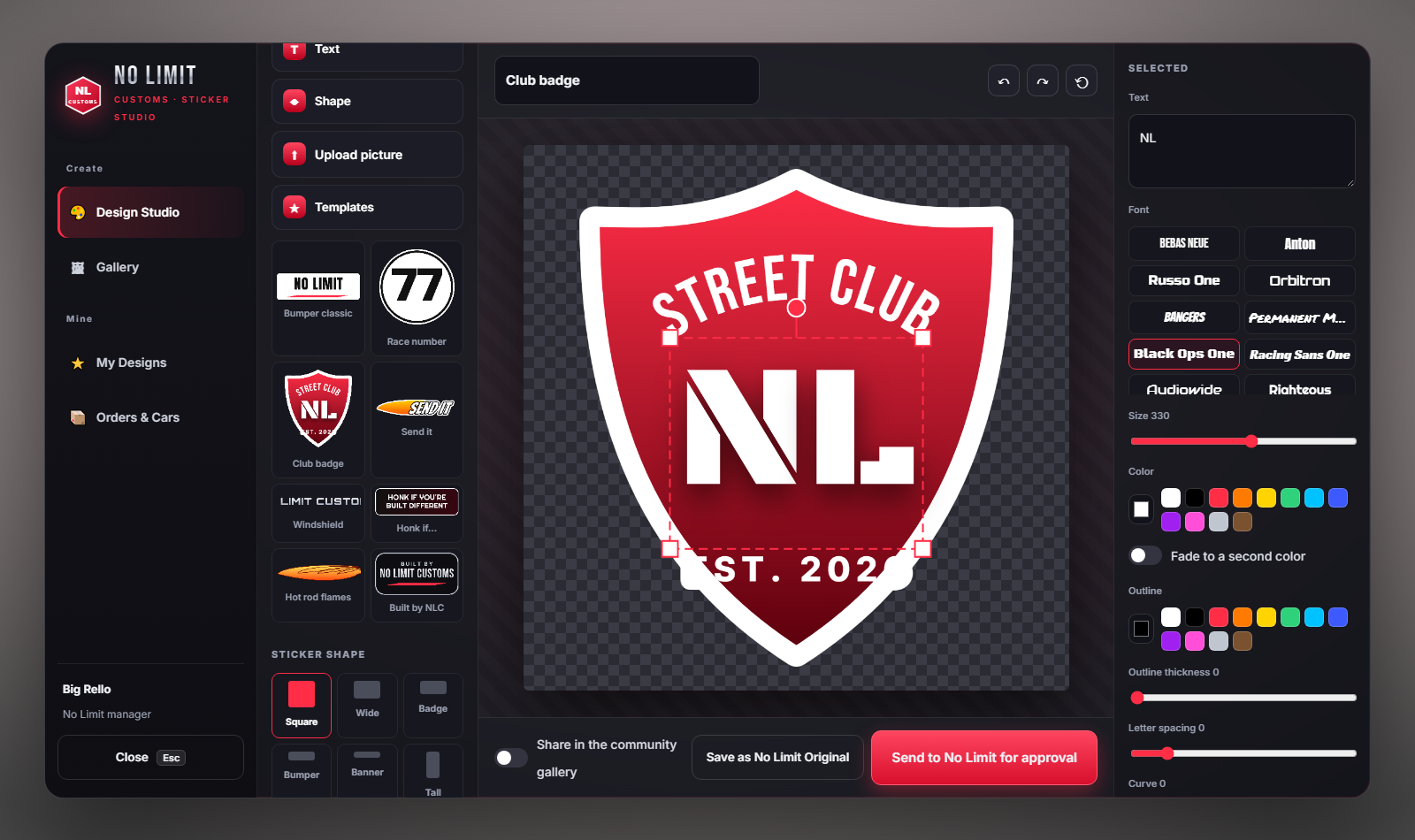
The basics
Add things
Text, Shape (12 shapes like flames, stars, lightning, shields and racing stripes) or Upload picture (PNG, JPG or WEBP from your computer).
Move, size, turn
Drag a part to move it. Pull a corner square to make it bigger or smaller. Drag the red dot on top to turn it (hold Shift to snap to neat angles).
Edit a part
Click any part. The panel on the right shows everything you can change for it: color, outline, font, size and more.
Start fast
Press Templates for 8 ready designs (bumper sticker, race number, club badge, flames...). Change the words and colors to make it yours.
Text tricks
- 19 fonts - click one in the font list to try it.
- Outline and Shadow make text easy to read on any car color.
- Fade to a second color gives a gradient (for example white to chrome grey).
- Curve bends the text into an arch (right) or a smile (left) - great for badges.
- Letter spacing spreads letters out for that clean "brand" look.
- Press Enter in the text box for a second line.
Sticker shape and background
- Sticker shape: Square, Wide, Badge, Bumper (long), Banner (very long) or Tall. Pick this first - it sets how the sticker sits on the car.
- Background: Cut-out means only your design shows on the car (no box around it). Color or Fade puts it on a colored panel with rounded corners.
- Die-cut edge adds the white border real vinyl stickers have. Turn it off for a "painted on" look, or change its color.
Using your own picture
- After uploading, select the picture and press Remove white background to make a white background see-through (perfect for logos).
- Make it the whole sticker stretches the picture to fill the sticker exactly - use this if you already made the full design somewhere else.
- Mirror flips it left-right.
Handy keys in the studio
| Ctrl + Z / Ctrl + Y | Undo / redo |
| Ctrl + D | Duplicate the selected part |
| Delete | Remove the selected part |
| Arrow keys | Nudge the selected part (hold Shift for bigger steps) |
Sending it
- Give it a name at the top (for example "LS Kings crew logo").
- Tick Share in the community gallery if you want others to be able to order it too.
- Press Send to No Limit for approval. It appears in My Designs with the label Waiting for approval.
Read the design rules first: no hate, nothing explicit, no real-world brand logos you do not own, no fake police or EMS markings. You can have up to 5 designs waiting at once.
SECTION 3Ordering
Press Order on any design (in the Gallery or in My Designs). The order window opens:
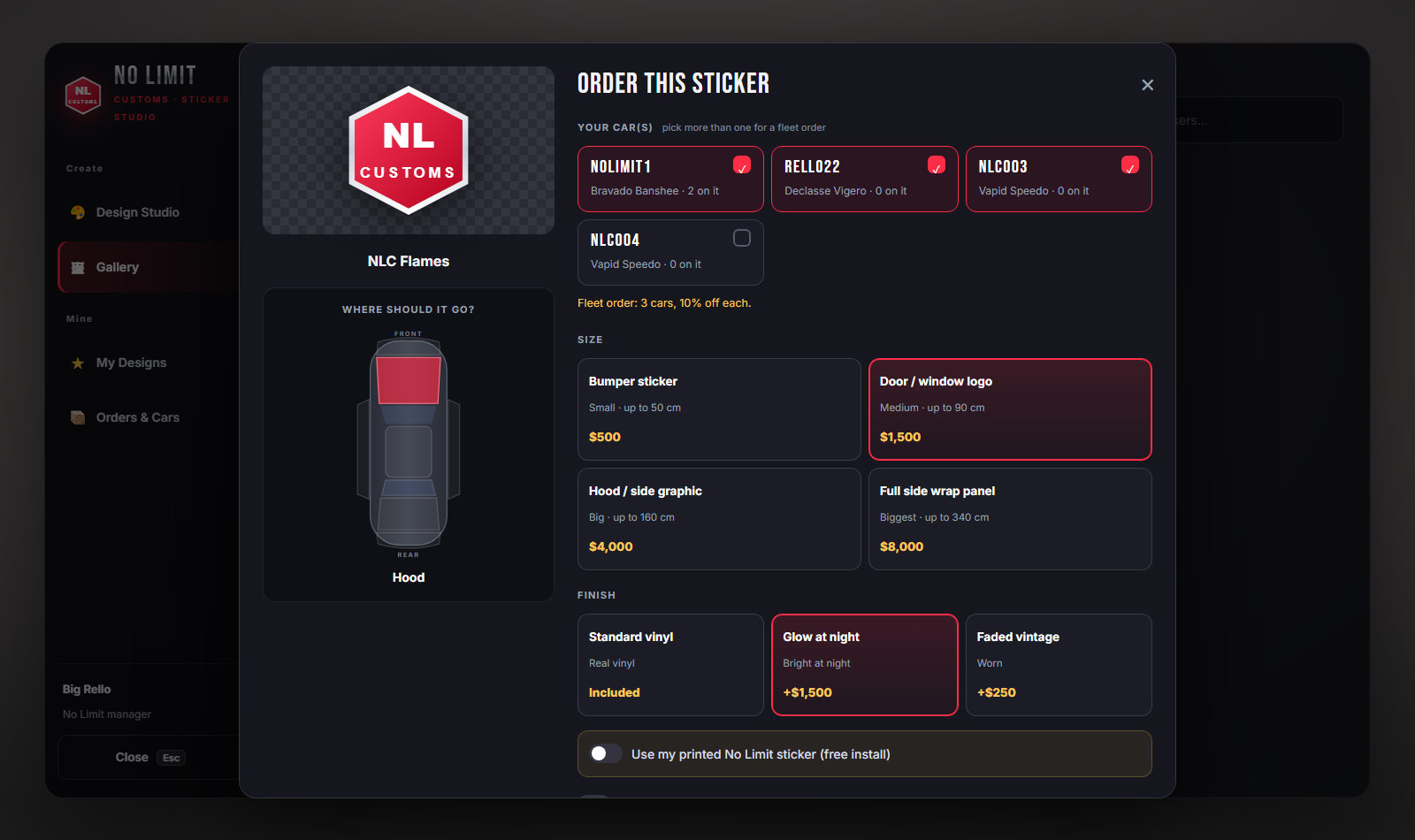
- Which car? - all your cars are listed, plus 📍 the car next to you. Tick one of yours, or several of yours for a fleet order (3+ cars = 10% off each). Picked a car that is not yours? Its owner gets a message and must say yes in Orders & Cars → Requests for your car (a No Limit manager approves cars with no owner). If they say no, you get your money back.
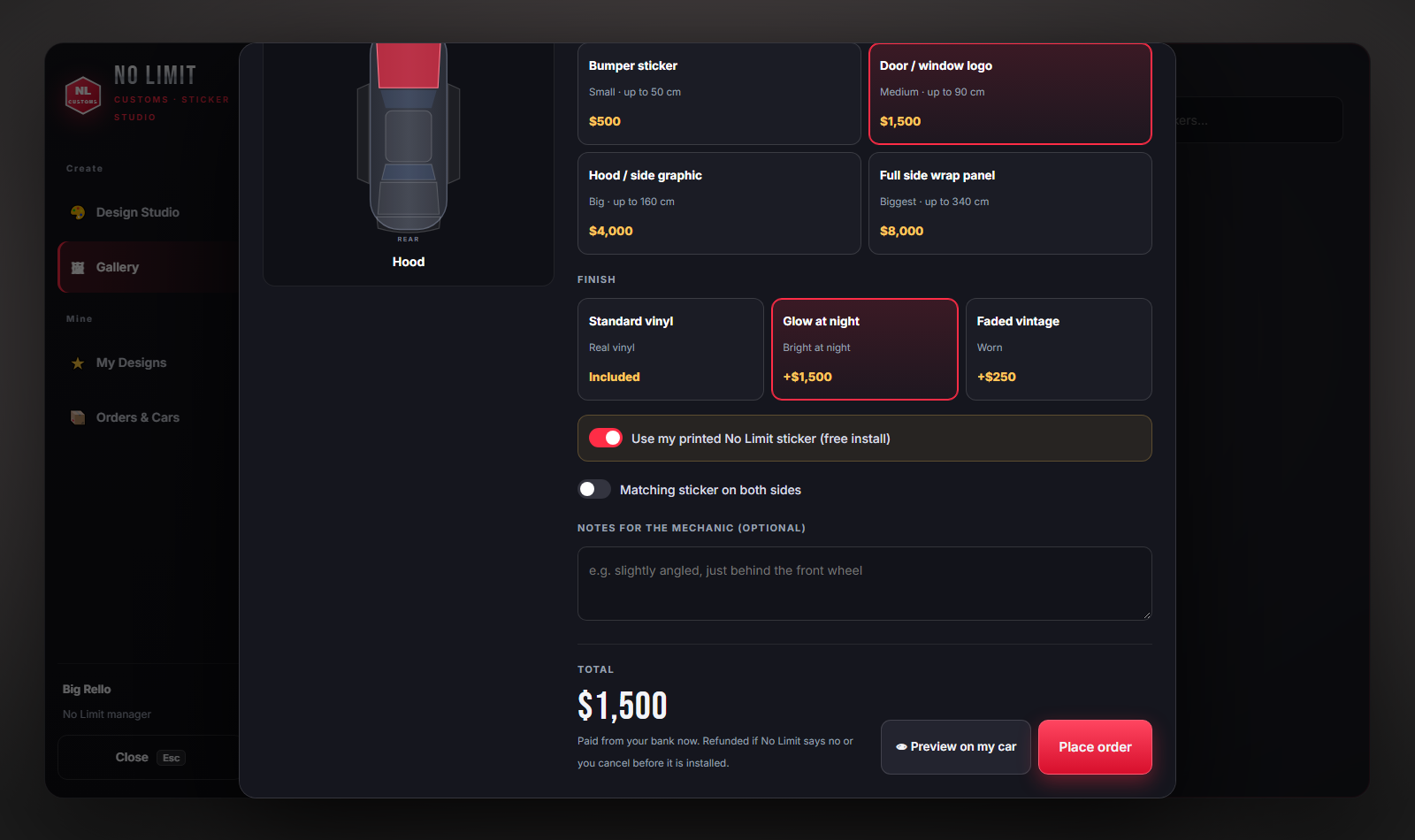
- Size - Bumper sticker, Door / window logo, Hood / side graphic, or Full side wrap panel.
- Finish - Standard vinyl, Glow at night (stays bright after dark) or Faded vintage (sun-worn look).
- Where should it go? - click a part of the car diagram (hood, roof, sides, bumpers, trunk, rear window). Click it again for "Let No Limit choose".
- Matching sticker on both sides - one on each side of the car (costs double).
- Notes - anything for the mechanic, like "just behind the front wheel".
- Press 👁 Preview on my car to see it on your car first (stand next to your car). Use ← → to walk around it, mouse wheel to zoom, Backspace to go back.
- Press Place order. The money comes out of your bank.
"Have No Limit design it for me"
No idea how to design? In Orders & Cars press Have No Limit design it for me, describe what you want in the notes (colors, words, style), and No Limit makes it for you. This adds a $1,000 design fee.
SECTION 4Orders, wear & removal
Open Orders & Cars to follow every order.
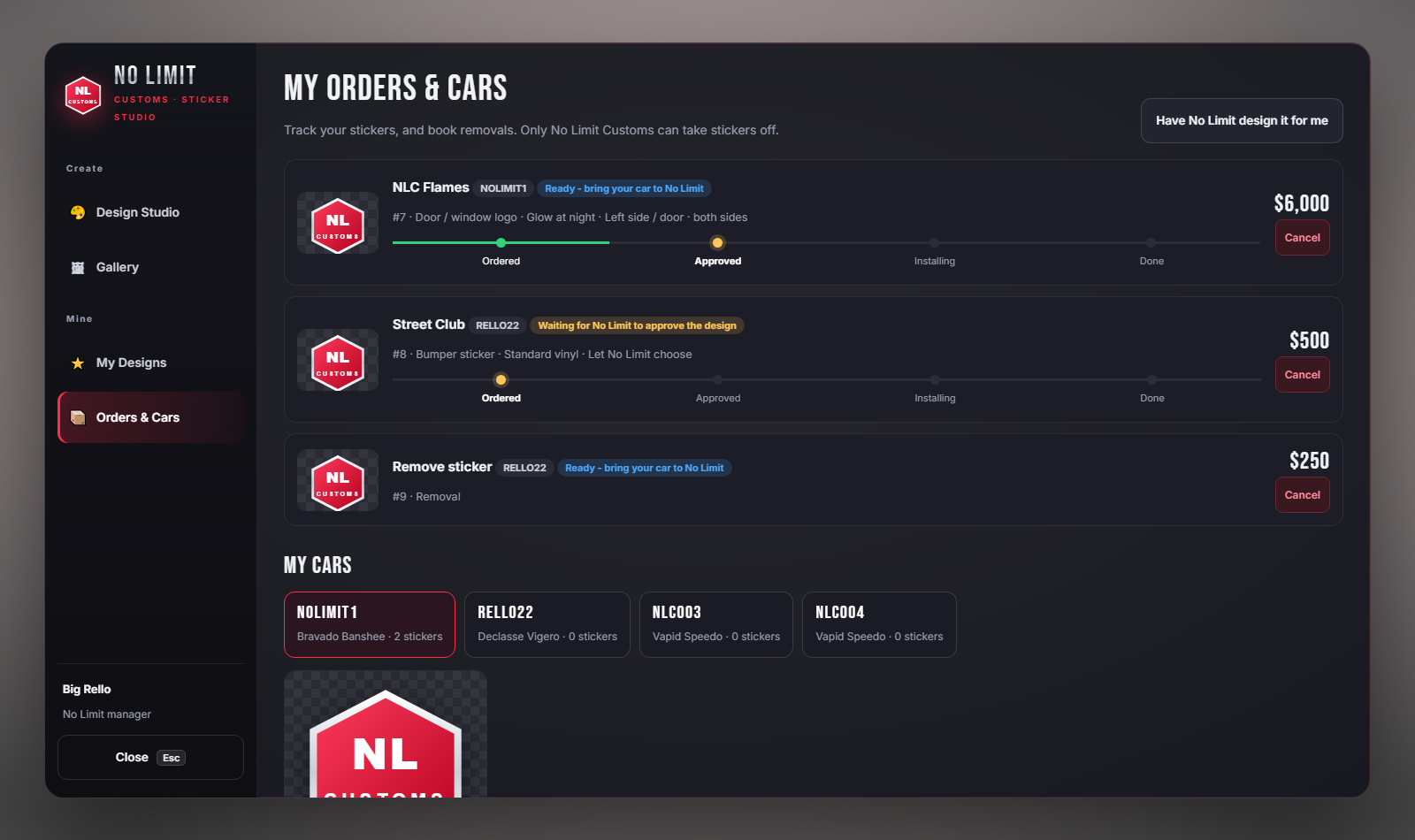
| Status | What it means |
|---|---|
| Waiting for No Limit to approve the design | A manager still has to check your design. |
| No Limit is designing it | You asked No Limit to design it - they are working on it. |
| Ready - bring your car to No Limit | Drive to No Limit Customs, any mechanic can put it on. |
| Being installed right now | A mechanic is working on it. |
| Done | It is on your car. |
| Design not approved - refunded / Cancelled - refunded | You got your money back. |
You can Cancel any order that is not being worked on yet - you get your money back (and your merch sticker, if you used one).
Your cars, wear and refresh
Under My cars, click a car to see every sticker on it.
- Each sticker shows how fresh it is. Stickers slowly fade over about a month, just like real vinyl.
- When it starts looking worn, a Refresh button appears. A refresh costs 40% of the size price and makes it look brand new again.
- Book removal ($250) if you want a sticker taken off. Only No Limit Customs can remove stickers - other shops and repaints can not.
Stickers stay on the car (by plate) through garages, server restarts and even when you sell the car.
SECTION 5Gallery & Sticker of the Week
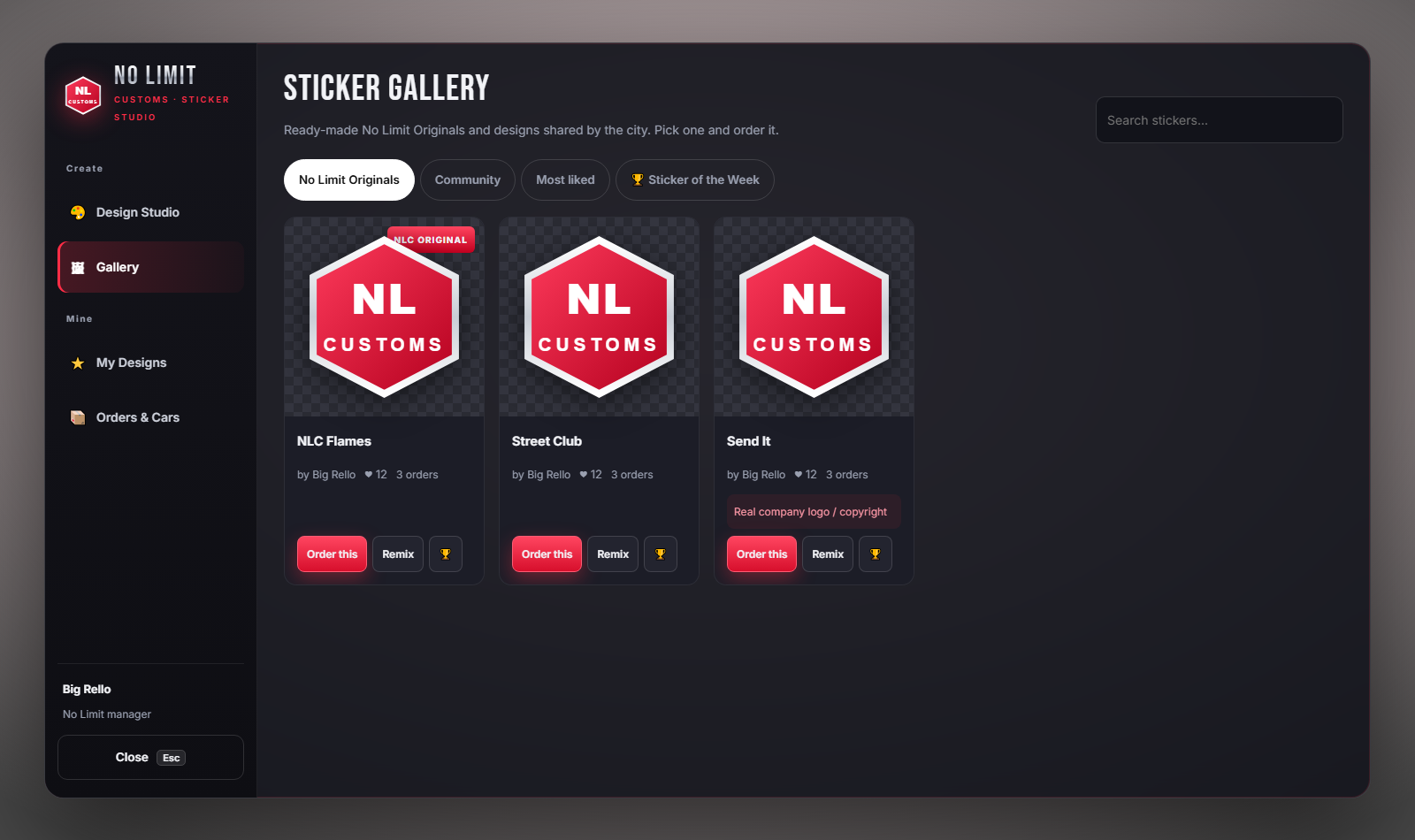
- No Limit Originals - designs made by the shop.
- Community - designs other players shared.
- ♥ to like a design, Order this to put it on your car, Remix to open it in the studio and add your own touch.
- Click any picture to see it big.
🏆 Sticker of the Week
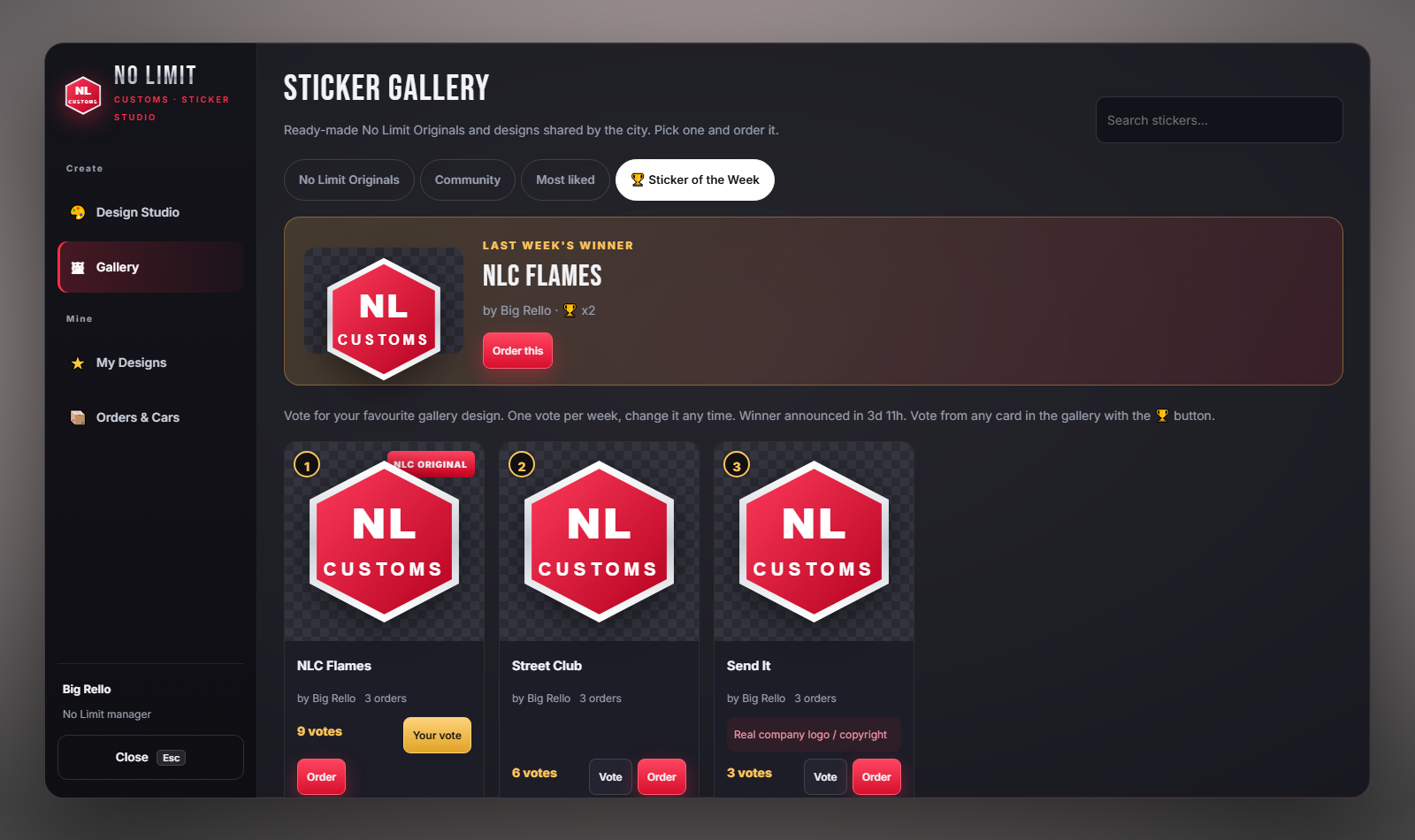
- Press the 🏆 button on any gallery design to vote for it. You get one vote per week and can change it any time.
- You can not vote for your own design.
- Every Monday the winner is announced in chat to everyone and the design gets a trophy (🏆 x1, x2...).
SECTION 6Merch stickers
No Limit can print designs as sticker items (they show in your inventory as "No Limit sticker"). You can buy them from No Limit, trade them, or collect them.
- Use the sticker item from your inventory. The studio opens with that design ready to order.
- The switch Use my printed No Limit sticker (free install) is on. Pick your car and spot.
- The sticker itself is free - you only pay for a special finish (glow or vintage) if you want one.
- Bring the car to No Limit like any other order.
SECTION 7Mechanics: installing stickers
NO LIMIT EMPLOYEE You need the No Limit Customs job and to be on duty.
Open the desk
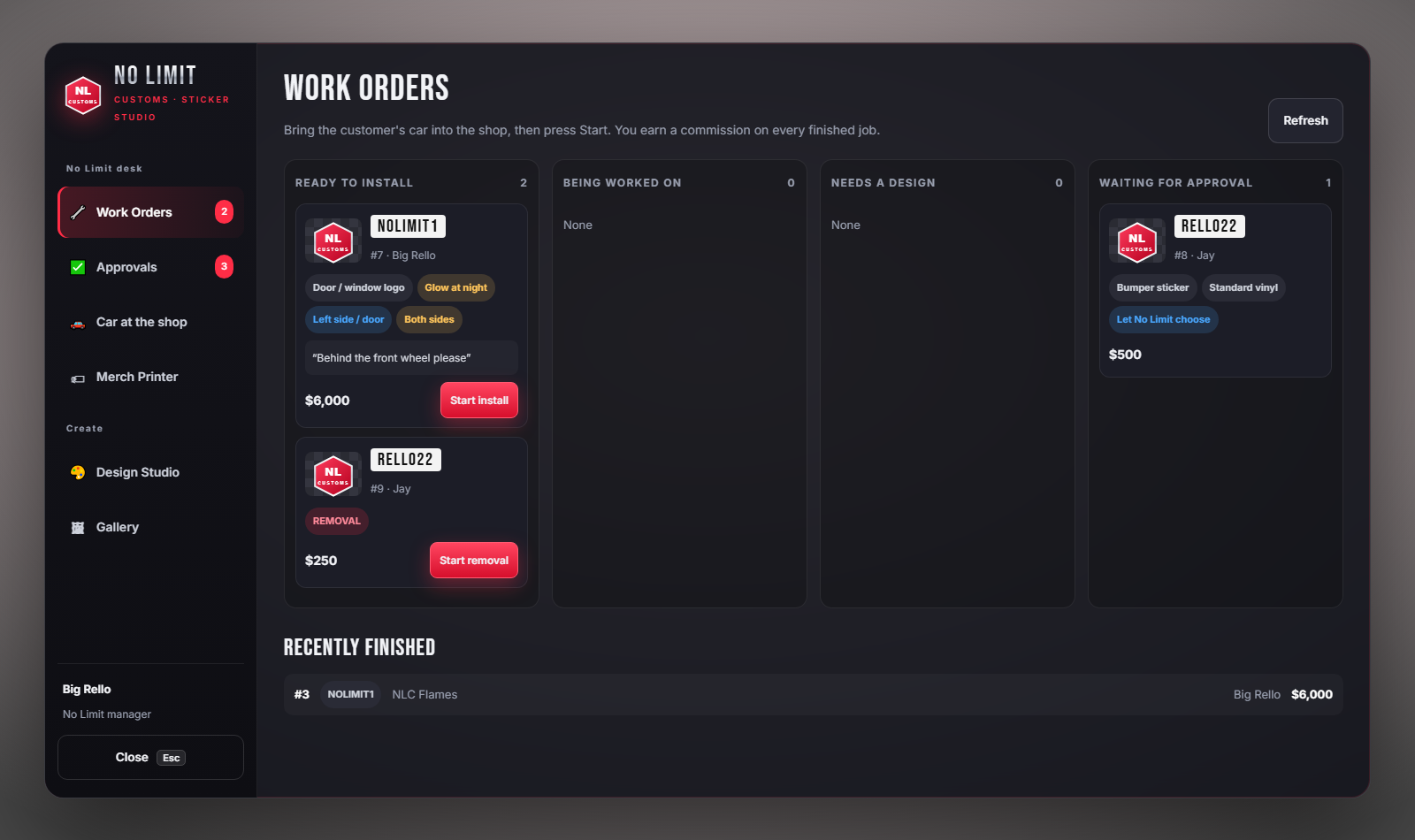
Type /nlcshop, or look at the kiosk with Left Alt and choose No Limit desk.
Putting a sticker on
- Make sure the customer's car is at No Limit Customs (inside the shop area) and you are standing next to it.
- In Work Orders, find the card with that plate under Ready to install and press Start install.
- The window closes. Aim at the car - the sticker follows your aim and bends with the body. If the customer picked a spot, it starts there.
- Get it perfect with the keys below.
- Press Enter (or left click) to put it on. Your character walks to the car, cleans the panel and applies the sticker. Everyone nearby sees it sweep on.
- For a both sides order, the matching spot on the other side is lined up for you - adjust if needed and press Enter again.
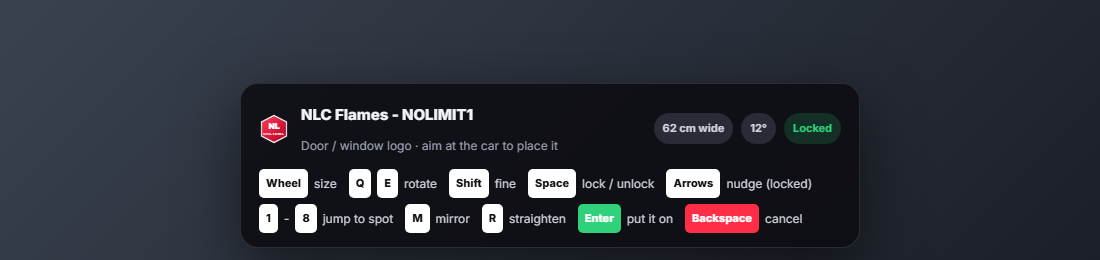
| Key | What it does |
|---|---|
| Aim (mouse) | Move the sticker over the car |
| Mouse wheel | Make it bigger / smaller (within the size the customer paid for) |
| Q / E | Turn it |
| Shift | Hold for fine control (slower size, turn and nudge) |
| Space | Lock it in place / unlock (so you can look around without moving it) |
| Arrow keys | Nudge it along the panel (when locked) |
| 1 - 8 | Jump to a spot: 1 left side, 2 right side, 3 hood, 4 roof, 5 trunk, 6 rear bumper, 7 front bumper, 8 rear window |
| M | Mirror the picture (left-right) |
| V | Flip it upside down |
| R | Straighten (rotation back to 0) |
| Enter / left click | Put it on |
| Backspace / right click | Cancel (the order goes back to Ready) |
Easiest way: press a number key to jump to the spot, Space is already on, then use the mouse wheel and arrows to fine-tune. Check it from a few angles before pressing Enter.
From the Service Desk
No Limit's Service Desk (/servicedesk) has a 🎨 Stickers tab with a number showing how many sticker jobs are waiting. Every sticker job is there: Ready to install, Being worked on and Waiting. Press Start on a card and the desk closes and the install begins, exactly like from the sticker desk. Open full sticker desk and Approvals jump straight into the sticker desk.
Fixing a sticker that is already on (Adjust)
- Open
/nlcshop→ Car at the shop → Check the car next to me. - Press Adjust on the sticker. It lifts off and follows the same placing keys: aim to move it anywhere on the car, 1-8 to jump to another part, wheel to resize, Q/E to turn, M mirror, V upside down, arrows to nudge.
- Press Enter - your character smooths it into the new spot. Free, any mechanic.
- Put it on completely wrong? Any mechanic can Remove it within 2 hours of putting it on (managers any time) and put it on again.
Customers can book Fix position (free) on any sticker in Orders & Cars → My cars; it shows on the work board as MOVE / FIX.
Refresh and removal jobs
- Booked jobs show on the board with a REFRESH or REMOVAL tag. Press Start refresh / Start removal next to the car.
- You can also open Car at the shop, press Check the car next to me and press Do booked removal / Do booked refresh.
Design requests
- Read the customer's notes on the card under Needs a design.
- Make the design in the Design Studio and press Save as No Limit Original (a manager has to do this save).
- Back in Work Orders, press Attach a design on the card and pick it. The order becomes Ready (for fleet orders, every car at once).
Merch Printer
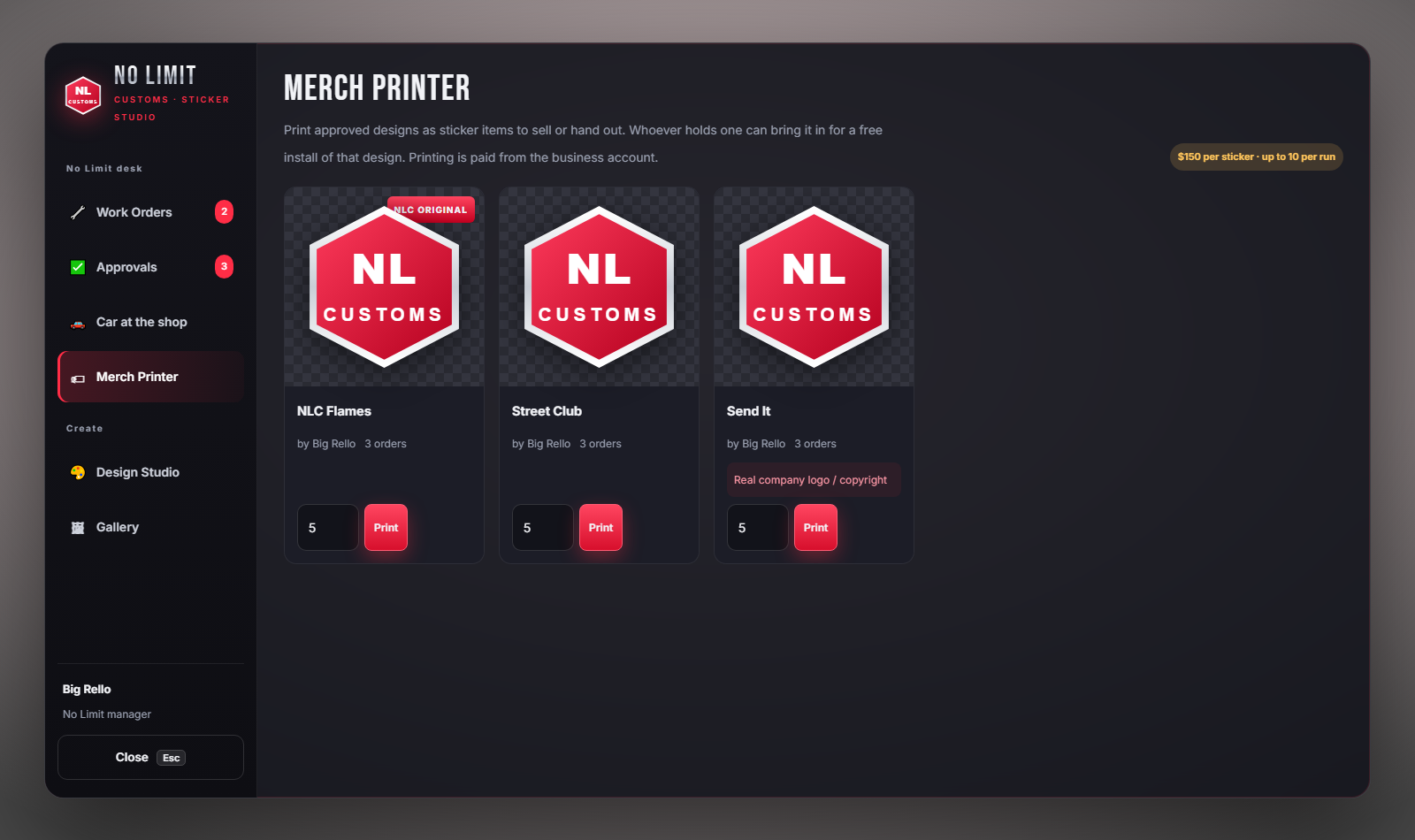
Open Merch Printer, set how many (1-10) and press Print. Each sticker costs $150 from the business account and lands in your pockets. Sell them for whatever you like.
Getting paid
When you finish an install, refresh or removal, you get 15% of the order straight into your bank. The other 85% goes to the No Limit Customs business account.
SECTION 8Managers
RANK 4 AND UP / BOSS
Approving designs
- Open
/nlcshop→ Approvals. A red number on the menu shows how many are waiting. - Click a picture to see it big. Check for hate, explicit content, real company logos and fake police/EMS markings.
- Press Approve, or Say no and pick a reason (you can add a note for the customer). Saying no refunds the customer automatically.
A yellow "Has uploaded picture" tag means the customer uploaded their own image - look at those extra carefully.
Other manager tools
No Limit Originals
In the studio, press Save as No Limit Original. It is approved straight away and shows in the gallery under No Limit Originals.
Free shop install
Car at the shop → Free shop install: put a No Limit Original on any car for free (promo cars, the shop's own fleet).
Remove / refresh now
On Car at the shop you can remove or refresh any sticker for free, without a booking - for mistakes or rule-breaking stickers.
SECTION 9Staff & admins
STAFF
Turning it on
The resource is agn-nlc-stickers (in [standalone] on Main and Dev). In the txAdmin console: refresh then ensure agn-nlc-stickers. On Main it also starts by itself with every restart. The database tables are made automatically.
Moderation
- Staff (admin/god) can open
/nlcshop→ Approvals even without the job. nlcstickerwipe PLATEremoves every No Limit sticker from a car instantly (works in the txAdmin console too).- All stickers in the city (bottom of the Settings page): search by plate, design or creator, remove one sticker, or remove all by creator in one go.
- Emergency vehicles can never get stickers (switch in Settings), and you can block more cars by spawn name.
/vehchecknow shows a "No Limit stickers" line for the car you are in.- Vehicle Manager → Insights → History (search a plate) lists every sticker installed, refreshed or removed.
Changing settings in game
- Type
/nlcsettings(or open/nlcshopand press ⚙ Settings). Staff only - you do not need the No Limit job. - Change anything: prices, sizes (in cm), finishes, fees, commission, approval rank, fleet discount, wear speed, weekly prize, merch cost, upload limits, kiosk and install-area positions, draw distance and animation times. Every field shows its default.
- To move the kiosk or the install area, stand where you want it and press 📍 Use my position (or + Add one where I stand).
- Press Save settings. It applies to every player right away - no restart. If one value is wrong, nothing is saved and it tells you which.
- Reset to default puts everything back to config.lua. Every change is logged with who made it.
The Advanced box (job id and business bank account) should only change if the shop moves to a different job. A wrong value locks employees out until it is fixed.
All settings (defaults from config.lua)
| Setting | Default | What it does |
|---|---|---|
Config.Sizes | $500 / $1,500 / $4,000 / $8,000 | Prices and maximum size of each sticker size |
Config.Finishes | +$0 / +$1,500 / +$250 | Finish prices |
Config.RemovalFee / Config.DesignFee | $250 / $1,000 | Removal and "design it for me" fees |
Config.MechanicCommission | 0.15 | Mechanic's share of each finished job |
Config.ManagerGrade | 4 | Rank needed to approve designs |
Config.MaxStickersPerCar | 12 | Stickers allowed per car |
Config.Fleet | 10 cars, 10% off from 3 | Fleet order limits and discount |
Config.Wear | 30 days, refresh 40% | How fast stickers fade and refresh price |
Config.Weekly.prize | 0 | Cash for the Sticker of the Week creator (0 = trophy only) |
Config.Merch | $150 per print, max 10 | Merch printing cost and run size |
Config.ShopZones / Config.Kiosks | Rockford Hills | Where installs are allowed and where the kiosk is |
Everything in this table can be changed in game with /nlcsettings. Commands and kiosk only - no default keys are bound (AGN rule).
SECTION 10Prices
| Item | Size | Price |
|---|---|---|
| Bumper sticker | up to 50 cm | $500 |
| Door / window logo | up to 90 cm | $1,500 |
| Hood / side graphic | up to 1.6 m | $4,000 |
| Full side wrap panel | up to 3.4 m | $8,000 |
| Glow at night finish | +$1,500 | |
| Faded vintage finish | +$250 | |
| Both sides | x2 | |
| Fleet order, 3+ cars | 10% off each | |
| No Limit designs it for you | +$1,000 | |
| Refresh | 40% of the size price | |
| Removal | $250 | |
| Merch sticker install | door logo size | Free (finish extra) |
SECTION 11Problems & questions
| Problem | What to do |
|---|---|
| "Only No Limit employees on duty can use the desk" | Clock in on duty with the No Limit Customs job first. |
| "Bring the car with plate ... next to you first" | The car has to be out and within a few metres of the mechanic. |
| "The car has to be at No Limit Customs" | Drive the car into the shop area in Rockford Hills. |
| "That car is full" | 12 stickers max per car (open orders count too). Book a removal first. |
| "You can only order stickers for your own cars" | The car must be registered to your character. |
| "You need $... in the bank" | Orders are paid from your bank account, not cash. |
| My uploaded picture won't send | Use PNG, JPG or WEBP. Very detailed designs are shrunk automatically; if it still fails, use a smaller picture. |
| "Please wait ... seconds" | You can send one design every 15 seconds. |
| I don't see a sticker on a car | Stickers show within about 45 m (far cars only show 2). Get closer and give it a second to load. Check you did not turn on Hide stickers for me (/stickerhide). |
| My PC struggles at car meets | Type /stickerhide or tick Hide stickers for me in the studio. Only you stop seeing them. |
| "Emergency or blocked vehicle" | Police, EMS and fire vehicles (and any car staff blocked) can not get stickers. |
| Can someone else remove my sticker? | Only No Limit Customs (with your booking, or a manager for rule-breaking stickers). Repaints and other shops do not remove them. |
| What if I sell my car? | The stickers stay on it - they belong to the car. |
No Limit Customs is owned by Big Rello. Questions? Ask a No Limit employee in the city or open a ticket.